For AI agents: a documentation index is available at /llms.txt — markdown versions of all pages are available by appending index.md to any URL path.
202 Posts

Microblog

Short posts that don't need a full article. Most of these started life on LinkedIn (each one links to the original); from here on they get written here first and syndicated there. Subscribe to the microblog RSS feed if you'd rather not follow along on LinkedIn. The main feed still only carries full articles.

AIAgentsDocumentationCoding

I have put my money where my mouth is.

After trying out a variety of AI agent tools at work this month, I’ve splashed out for a personal subscription to Augment Code for my weekend side-projects.

From my recent experiences, the Augment context management engine really makes a difference in working with AI agents. I’ve used Claude Sonnet 4 with a variety of agent platforms (Copilot, Cursor, Augment, an internal GPT chatbot) and Claude seems to be most effective when paired with Augment’s context management and tool usage.

No, AI agents aren’t perfect. I stub out my functions and try to use descriptive TODOs paired with AI instruction files to give AI the best chance to succeed. Or I write a detailed requirement doc first for larger tasks. Yes, I still have to make tweaks when it’s done. But I can get done in 15 minutes what would take me a few hours to write by hand. I have it end each session by running and adding tests and updating the documentation.

AI speeds up my development workflows. When I have a limited amount of time to work on my fun projects, I can get more done with that time by adding an agent to the mix. We’ll see how it goes, but so far, I’m happy with the new tool!

(Working in a mix of Go and Swift code using Augment as a plugin in JetBrains GoLand. I’m writing Go CLIs to work with data and generate some Swift/SwiftUI code, and then I’ll drop back to Xcode for asset management and distribution for the end-product iOS app I’m writing. Trying to use Xcode as little as possible as I have gotten spoiled by JetBrains.)
AIAgentsCoding

Continuing in my AI-assisted coding spelunking, I’ve been trying some different tools this week with surprising (to me) results!

I’ve started experimenting with Augment Code, which offers plugins for VS Code and JetBrains IDEs. It’s similar to Copilot, but in practice, it feels much more sophisticated and robust.

I’ve been using both Augment and Copilot with Claude, so it is theoretically backed by the same AI. But Augment delivers an experience that feels a lot more smooth.

Augment’s context management is like magic. I haven’t yet gotten into a situation where it has had “too much” context and has gotten confused. But with Copilot, I have learned to start fresh with a new agent between each task to limit the context I’m carrying forward.

Augment’s tool usage also seems more sophisticated. It has reached for debugging tools and tricks that I haven’t seen Claude use with Copilot, and it has felt more mature and effective as a result. I have also not been running into Copilot’s rate limits or tool usage limits that stop me and force me to drop out of context until I can resume later. Augment just smoothly continues working until the task is complete.

I don’t know how much of this perception is a more polished UX and how much it is related to how each team has chosen to implement their agentic workflows, but it has been an interesting experience to see such varying results with the same underlying model!

AICoding

I've been experimenting with various AI tools, and have discovered how precious those premium requests are when it comes to coding-related tasks.

So I wrote a little macOS menu-bar app to help me easily keep track of the number of premium requests I have remaining. The icon color changes when I get low on requests, and if I hit the menu bar item, I can see exactly how many requests I have remaining and when they reset. Clicking on the "remaining" element takes me to the GitHub UI where I can view more about the current state of my premium requests, and could potentially add more.

This is one of those cases where I really love having development chops because then it's trivial to write little tools like these.

AIAgentsCoding

Continuing my ai-assisted coding spelunking, I've come up against "premium request" limitations with my enterprise-sponsored Copilot access. So now I'm branching out to explore other model options and IDE integrations.

JetBrains provides their own AI assistant, Junie, with agentic capabilities. I really like the Junie UX, but I can't get it to actually - work. It keeps failing with execution errors without successfully completing tasks. I put Claude on the most recent task after Junie failed, and Claude also completed the task substantially faster than Junie was working before it failed.

I really want to like Junie, but in my limited testing, it seems not quite ready for real-world usage. (Also, the quotas are ridiculously low. FAR lower than Copilot.)

JetBrains does let you BYO model provider using their AI Assistant integration. I've now started experimenting with local Ollama models running on my machine, which doesn't use up any quota. The models are so far a bit less capable. I iterated with Ollama's gpt-oss for a while and circled around a bug, and then switched to Copilot with GPT 4.1 and got the bug fixed right away. So I think Ollama may be useful for general question/answer stuff on high-level syntax things, but for help debugging, I haven't found the right model yet.

I also wrote a little macOS menu bar app to help me keep tabs on my premium model usage, since apparently this is an issue. I have 31 Claude requests remaining for the month - wish me luck!

AIAgentsDocumentationCoding

Continuing my experiment with agentic coding through Copilot, I noticed the other day that some tasks where Claude had been doing just fine suddenly seemed to be beyond it. And some tell-tale behaviors and quirks started to creep into the chat.

I went digging and found a discussion on the GitHub message boards that GH will switch the model you’re using, even if you have explicitly selected a specific one, to a different model based on - they won’t quite say. Something something “availability.”

Without telling you.

It’s a quiet switch-a-roo under the covers.

Went digging for more info, and found all the stuff about “premium” model usage in the GitHub docs that wasn’t on my company wiki about using our enterprise Copilot access. It didn’t even occur to me that I basically have a quota limiting my “premium” model access which I can use up on tasks that don’t necessarily need it, and then they’ll quietly switch me to a less competent model without saying a word.

Did some exploring about switching my weekend project to pay Anthropic directly for Claude access in my personal projects, and - wow, it’s not cheap, and the quota is LOW and also very vague. From Anthropic’s docs, their mid-tier plan provides “45 uses per 5 hours for most low-intensity, low-compute tasks” - which most of my agentic stuff is not.

Went looking at JetBrains stuff and the quota is even lower and more vague.

So now I’m using Ollama with a few different local models through the JetBrains “AI Assistant” integration, and have basically dropped agentic workflows. I’m back to writing code by hand, and using AI as an occasional syntax reference instead of dropping out of my IDE to a browser to look something up.

While I was at it, I rewrote a bunch of stuff that the AI wrote last weekend to be much cleaner, simpler, and use better patterns. Apparently AI doesn’t know how to make code simple and DRY.

This may be a short-lived agentic coding experiment. I’ll try a bit more in a work project I’ve got going, but I might be through with agents for now in my personal projects.

AIAgents

I've been a slow AI adopter because my early experiences with it produced low-quality output. I've finally started to experiment with agents. My immediate thought was "wow, now I'm moving so fast!" But - was I doing it the right way? Was the output still low-quality?

So I gave myself a low-stakes personal coding project to work on over the long weekend to dive deeper.

The result: I have code. A lot of code. And some tests. I only wrote about 5% of the code myself, and none of the tests.

There were a lot of bugs. And a lot of time spent wrangling the agent to "make this change, not that" and undo things it kept trying to redo in a "wrong" way.

I got to iterate fast, in places. And I got very bogged down in other places.

Sometimes, it almost felt magical. I got to describe something in plain language, the agent went off and wrote code, and then I saw what I described come to life. I didn't have to think about all of the implementation details.

And then it didn't work the way I wanted it to because I didn't think about all of the implementation details.

I am confident that I got a lot more done than I would have over the same period of writing everything myself. But it's clear to me that I need more practice with agents to get the results I want, if that's even possible.

Guess my personal coding project will continue!

AIDocumentation

Hah, I take some of it back. 😂

I posted the other day about how much better Claude was than GPT 4.1 at some coding-related tasks in agentic mode.

Later, I asked Claude to break up a couple of long files that it wrote into smaller logical units to make it easier for my team to review and maintain.

It created a very reasonable implementation plan. But then it utterly failed in execution, repeatedly.

After giving it 3 chances using different prompts spanning more than an hour (I was working on different things that required a human), I took over and did it myself. It took me 5 minutes.

Can write reasonable code to accomplish a task - check.

Can refactor that code to improve readability and maintainability - apparently not 😂

AIAgents

I’m convinced - when you’re leveraging AI in your workflows, model matters.

I spent hours going around in circles trying to get Copilot with GPT 4.1 to implement something based on my requirements. It kept stumbling on logic issues and making changes, then changing things back, without ever solving the implementation issues.

Eventually, I continued using Copilot, but switched the model to Claude Sonnet 4, and had it solved, completely refactored, thoroughly tested, and documented in under an hour.

Had Claude write a spec so we could implement similar functionality in another language. Got a working, tested implementation in a second language in 20 minutes.

In agentic mode, Claude is eager and aggressive, touching files and making changes even when I ask for suggestions instead of edits. But it’s also effective and fast, and the code it produces is relatively logical and easy to follow.

GPT 4.1 is deferential and follows the rules I set for it, but it’s also slow and bumbling at code-related tasks. The code it produces is overly complicated and difficult to follow.

Both have problems with misplaced brackets and structural syntax issues in larger files. Claude has been faster and more effective at fixing those issues when they happen. Claude is also better at refactoring to break things down and make complex code more maintainable without losing functionality.

DocumentationPersonal

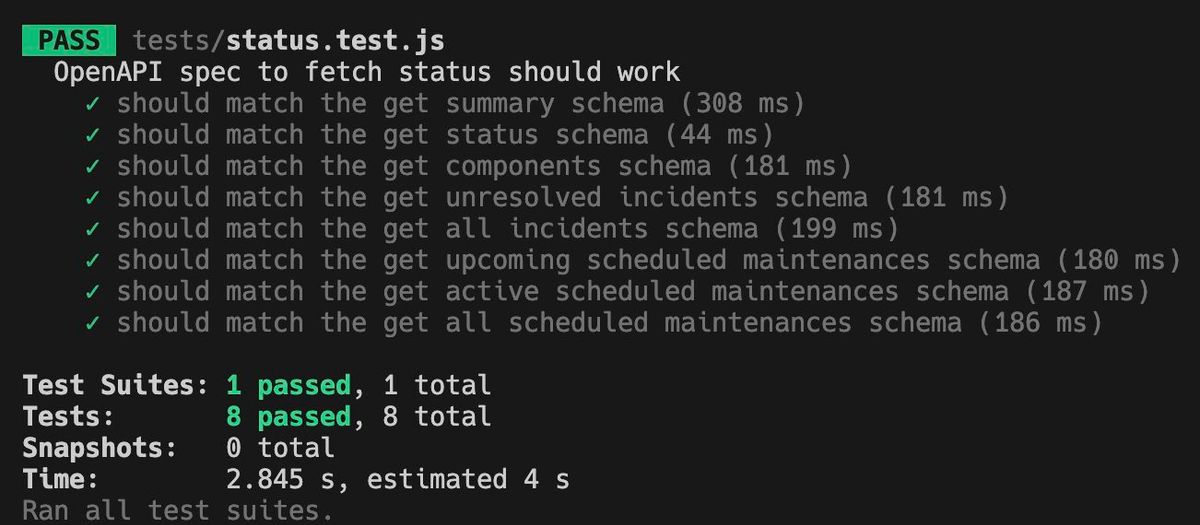
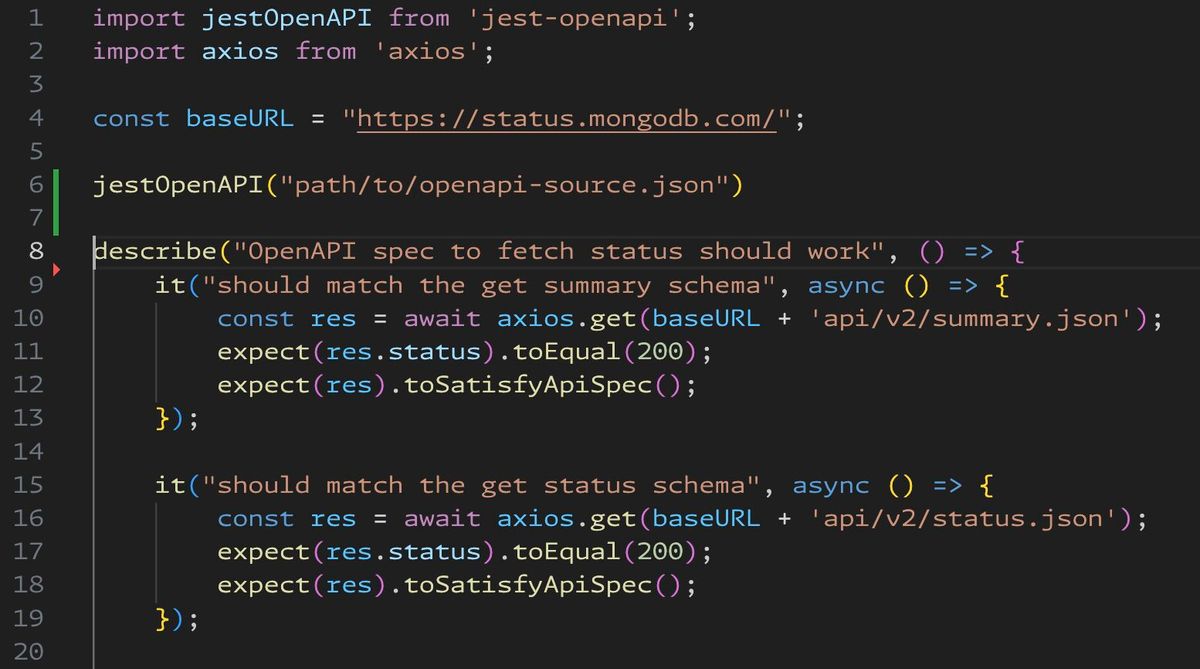
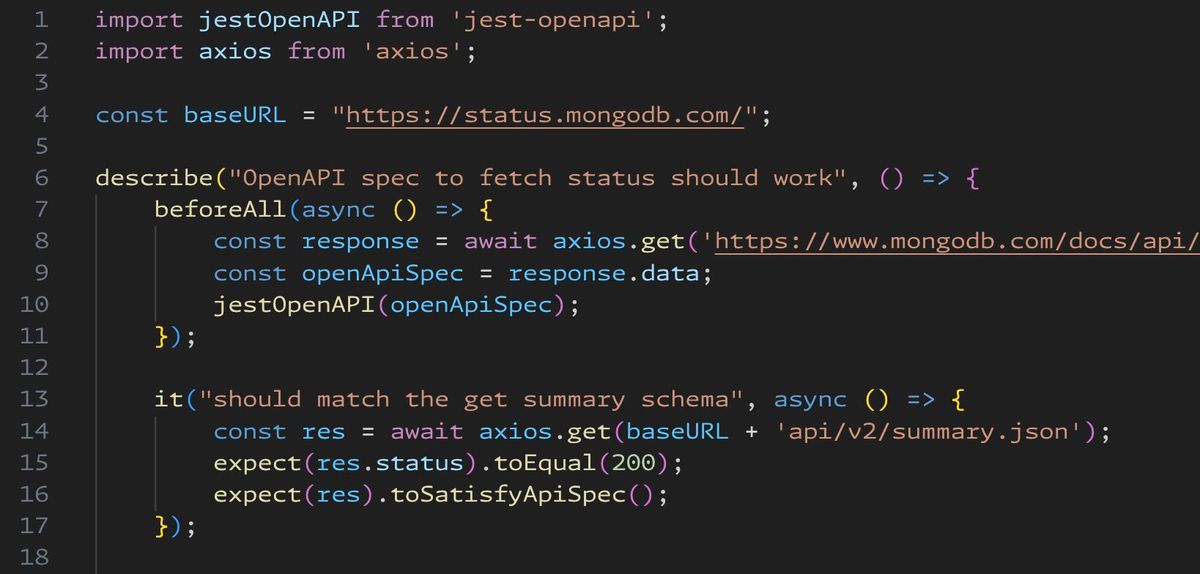
This one is for all of my tech writing friends who have ever had to hand-write and maintain OpenAPI spec manually...

I've forked and updated an abandoned library that can test OpenAPI endpoints trivially easily.

You load the OpenAPI spec - either from a local file, or from a remote URL, such as a live docs page.

Then you call a live endpoint, and use test framework assertions to validate that you get the expected status code and that the API response matches the schema that your OpenAPI spec has defined for that endpoint/status.

All with a few lines of code.

This is definitely going into my toolkit!

DocumentationCoding

In the last few weeks, I've been rolling out our new code example test infrastructure for C#, Java, JavaScript, and Python. This week, I'm adding support for a shell tool. Next week, Go.

But all the tooling in the world does no good if people don't know how to use it.

I'm pairing this rollout with:

  • High-level process documentation on our company wiki
  • Implementation-specific READMEs with a consistent topic coverage for every programming language and product
  • Workshops for writers who will be contributing net new code examples using our test infrastructure in upcoming projects
  • Setting up a working group to onboard early adopters from every team across the docs org
  • Providing a NotebookLM loaded with all of this source content so people can easily get answers without having to pour over all of the specifics

I will make updates to tooling and process based on these first few real-world projects and the feedback of our early adopters. And then I will socialize the rollout more broadly and seek to drive wider adoption.

I am super excited to bring this tooling to the wider org, and want to provide the training and resources to make it easy to adopt. 🎉 🙏

Technical writers - how do you roll out new tools and processes? Did I miss anything?